Zero False Positives: Architecting an Android Security Module That Knows the Difference Between Root and MDM
Introduction
Mobile applications operating in regulated industries — fleet management, healthcare, finance — face a unique challenge: they must protect sensitive data on devices they don't fully control. Rooted phones, hooking frameworks, repackaged APKs, and emulators all represent real attack vectors that can compromise data integrity and regulatory compliance.
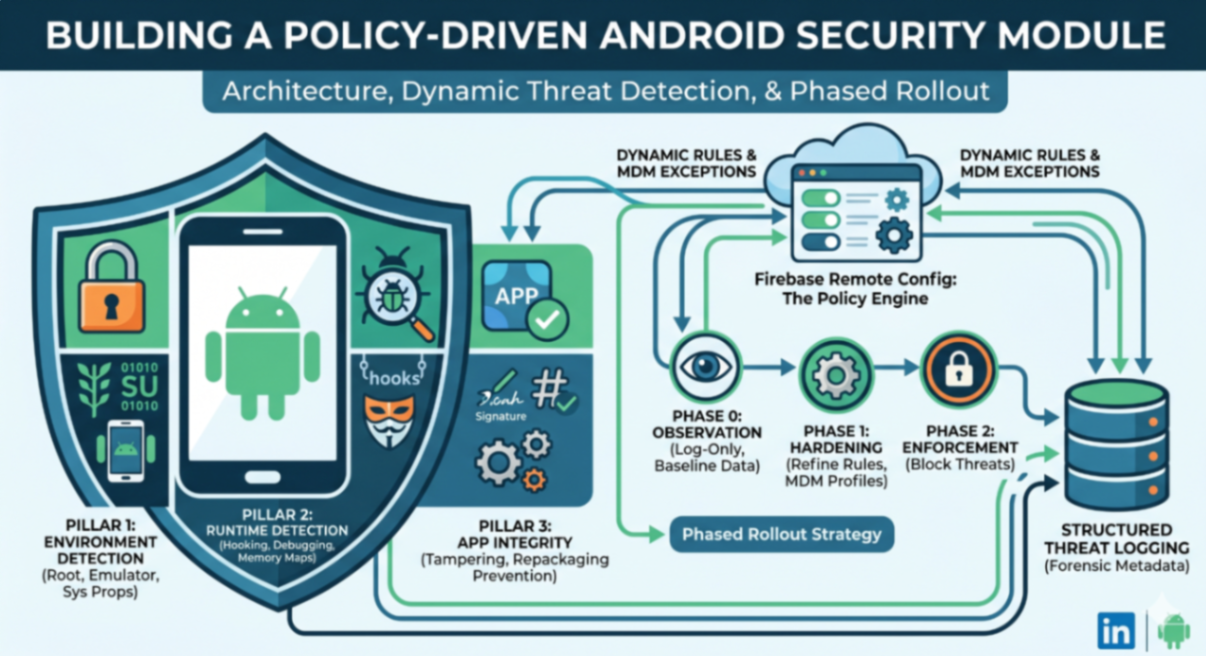
This blog walks through the architecture of a dedicated Core Security Module designed as a self-contained Android library. It covers the three-pillar detection system, the policy engine powered by Firebase Remote Config, structured threat logging for analytics, and the phased rollout strategy that lets you ship security enforcement without breaking your user base.
Module Architecture Overview
The security module follows Clean Architecture principles, organized into clear layers:
core-security/
├── domain/ → Models, repository contracts, use cases
├── data/ → Repository implementations, detection logic, workers
├── policy/ → Policy engine, security gate, config provider
├── di/ → Hilt dependency injection wiring
└── utils/ → Coroutine context providers
The module exposes a single facade interface to the host application. The host app never interacts with internal detectors, repositories, or policy logic directly. This keeps the security implementation fully encapsulated and independently testable.
Key Design Decisions
Single entry point: One public interface is the only contract between the module and the host app.
Flow-based observation: Security results are emitted via Kotlin
SharedFlow, allowing the host to reactively respond to threats without polling.Lifecycle-aware: The module registers activity lifecycle callbacks to trigger checks on resume — no manual wiring needed in each screen.
Background scheduling: WorkManager runs periodic checks every 30 minutes, surviving process death and respecting battery constraints.
The Three Detection Pillars
Security checks are organized into three independent "pillars," each responsible for a distinct category of threats. This separation makes it easy to toggle, extend, or replace individual pillars without affecting others.
Pillar 1: Environment Detection
Examines the device's static environment for signs of compromise:
Pillar 1: Environment Detection
Examines the device's static environment for signs of compromise:
Check | What It Detects |
|---|---|
SU binary in PATH | Root binary accessible via system PATH entries |
Root management files | Known root files at standard filesystem locations ( |
Dangerous system properties | Properties like |
Writable system partitions |
|
Emulator detection | Generic brands, suspicious models, known emulator fingerprints |
Root management apps | Installed packages like Magisk, SuperSU, KingRoot |
Each check produces structured forensic metadata — the exact file path found, the property name and value, the mount options detected. This metadata is critical for the observation phase (more on that below).
Pillar 2: Runtime Detection
Monitors the running process for active instrumentation and debugging:
Check | What It Detects |
|---|---|
Native debugger (ptrace) | TracerPID > 0 in |
Frida server | Default Frida port (27042) open on localhost |
Java debugger (JDWP) |
|
Suspicious memory maps | Frida/Gadget/Agent tokens in |
Fileless malware | Deleted but still-loaded executable libraries |
Runtime hooks | Xposed/LSPosed class fragments in stack traces |
The memory map scanner is particularly sophisticated. It:
Applies a whitelist of known-good patterns (kernel vDSO, JIT caches, vendor drivers)
Checks suspicious tokens against trusted system paths to filter OEM noise
Detects deleted-but-executable libraries as potential fileless malware
Pillar 3: Integrity Detection
Validates the application itself hasn't been tampered with:
Check | What It Detects |
|---|---|
APK signature verification | Compares runtime signature hashes against expected values |
Obfuscation validation | Verifies code obfuscation is present (anti-reverse-engineering) |
Signature verification catches repackaged APKs — a common vector for injecting malicious code into legitimate apps.
Structured Threat Logging
Every detected threat produces a ThreatDetail object containing:
ThreatDetail(
signal: String, // e.g., "Runtime: Frida server detected"
metadata: Map<String, String> // Forensic key-value pairs
)
Why Structured Logging Matters
Raw "device is rooted" alerts are useless for policy refinement. Structured metadata answers the questions that matter:
Which specific file triggered the alert? → Helps identify MDM false positives
What memory region contained the suspicious token? → Distinguishes real Frida from OEM "agent" libraries
Which property had a dangerous value? → Identifies devices with legitimate debug configurations
Metadata Keys by Pillar
Environment:
file_path,path_entry— exact location of root artifactsproperty_name,actual_value,expected_value— system property detailspartition_path,mount_options— writable mount evidencebrand,device,fingerprint,model— emulator indicators
Runtime:
tracer_pid,debugger_type— debugger attachment detailsfrida_port,status— Frida server evidencelibrary_path,matched_token,memory_line— memory map findingshook_class,hook_method,matched_fragment— hooking framework traces
Integrity:
expected_signature,actual_signatures,mismatch_reason— signature comparison results
Logging Format
Each threat detail can be serialized to a compact log string:
Security[RUNTIME]: FRIDA | frida_port=27042, status=open, process_name=frida-server
Security[ENVIRONMENT]: ROOT_APPS | package_name=com.topjohnwu.magisk, detection_method=package_manager_query
This format is designed for ingestion by analytics pipelines (Firebase Analytics, Crashlytics custom keys, or backend telemetry endpoints).
Firebase Remote Config: The Policy Engine
This is where the architecture becomes truly powerful. Rather than hardcoding security behavior, the module is driven by a JSON policy document fetched from Firebase Remote Config.
Why Remote Config?
Capability | Benefit |
|---|---|
No app update required | Change security behavior instantly across all devices |
Phased rollout | Move from observation → enforcement without code changes |
False positive suppression | Add MDM package exceptions without a release cycle |
Kill switch | Disable blocking globally if a bad policy ships |
Signature updates | Add new root package names or suspicious tokens dynamically |
Per-device targeting | Firebase supports conditions (app version, country, user properties) |
Policy Structure
The remote config payload is a structured JSON document with these sections:
{
"version": 12,
"master_switch": {
"enabled": true,
"phase": 0,
"showRootedScreen": false,
"analyticsEnabled": true
},
"profiles": {
"mdm_workspace_one": {
"description": "VMware Workspace ONE MDM",
"exceptions": {
"ignoreRuntimeHooks": true,
"ignoreMemoryMaps": true
}
}
},
"profileBindings": {
"mdm_workspace_one": ["com.airwatch.androidagent"]
},
"threat_signatures": { ... },
"policy_toggles": { ... }
}
Key Sections Explained
Master Switch — Global controls. The phase field drives the entire enforcement strategy (see next section). The enabledflag is a kill switch. showRootedScreen controls whether the blocking UI appears.
Profiles & Bindings — MDM-aware exception handling. If a device has com.airwatch.androidagent installed, the mdm_workspace_one profile activates, and its exceptions suppress false positives caused by the MDM agent's legitimate hooking behavior.
Threat Signatures — Dynamic detection parameters. Root file paths, suspicious memory tokens, emulator indicators, and expected APK signature hashes are all configurable remotely. New root tools can be detected without an app update.
Policy Toggles — Individual check enable/disable flags. Each of the 13+ detection checks can be toggled independently. Useful for disabling a check that's producing noise on specific device families.
Config Loading Strategy
The module uses a three-tier fallback:
Remote — Fresh config from Firebase (fetched centrally at app startup)
Cache — Firebase's local disk cache from a previous session
Bundled — A
security_config.jsonshipped in the APK's raw resources
This ensures the module always has a valid policy, even on first launch with no network.
Real-Time Config Updates
The module subscribes to Firebase's real-time config update stream. When the security policy key changes server-side:
Policy is re-synced immediately (no waiting for the next fetch interval)
A fresh security check runs with the updated policy
Results are emitted to the host app
This means you can push an emergency policy change and have it take effect across your fleet within seconds.
The Three-Phase Rollout Strategy
The most critical architectural decision is the phased deployment model. Security enforcement is not a binary switch — it's a graduated process.
Phase 0: OBSERVATION
Behavior: Run all checks, log all threats, NEVER block the user
Duration: Weeks to months
Goal: Collect baseline data, identify false positives
During observation, every threat is logged with full forensic metadata to your analytics pipeline. You learn:
What percentage of your fleet triggers each check
Which threats are MDM false positives
Which device families produce noise
Phase 1: HARDENING
Behavior: Run all checks, log with enhanced metadata, still NEVER block
Duration: Weeks
Goal: Refine profiles, validate exception rules
Hardening is where you create and test MDM profiles. You add package bindings, configure exceptions, and verify that legitimate MDM devices no longer trigger false positives. The enhanced metadata helps you validate that your filtering is working correctly.
Phase 2: ENFORCEMENT
Behavior: Run all checks, apply policy filtering, BLOCK on remaining threats
Duration: Permanent (with ongoing policy refinement)
Goal: Protect the application from compromised devices
Only after observation and hardening have proven the policy is accurate do you flip to enforcement. Even in enforcement mode, the policy engine filters threats through MDM profiles before the security gate makes its final block/allow decision.
The Security Gate
The gate is the final decision point:
Detection (16 checks) → Policy Engine (filter MDM noise) → Security Gate (block/allow)
The gate's logic is simple:
OBSERVATION or HARDENING → never block
ENFORCEMENT → block only if
showRootedScreenis enabled AND filtered threats remain
This separation means the detection layer is always running at full fidelity. The gate just controls whether the user sees a blocking screen.
Integration with the Host Application
Initialization
The host app initializes the policy engine once at startup. The module waits (with a bounded timeout) for Firebase config readiness, then loads the policy:
If Firebase is ready → loads remote policy
If Firebase times out → falls back to bundled policy
Either way, the module is operational within milliseconds
Monitoring
After initialization, the host calls startSecurityMonitoring() which:
Schedules a WorkManager periodic task (every 30 minutes)
Subscribes to real-time Firebase config updates
Begins emitting results via the shared flow
On-Demand Checks
For critical actions (login, data export, compliance report generation), the host can trigger an immediate check. This returns a result synchronously (within the coroutine context) rather than waiting for the next scheduled check.
Lifecycle Integration
The module registers activity lifecycle callbacks. Every time an activity resumes, a security check runs automatically. This catches scenarios where a device is rooted while the app is backgrounded.
Testing Considerations
The pillar-based architecture makes testing straightforward:
Unit test each detector independently with mock snapshots
Unit test the policy engine with various config payloads and installed package sets
Unit test the security gate with different phase/threat combinations
Integration test the full pipeline from snapshot → detection → filtering → gate decision
The config provider's fallback logic ensures tests can run without Firebase by using bundled defaults.
Summary
A production-grade mobile security module needs more than root detection. It needs:
Multi-pillar detection — Environment, Runtime, and Integrity checks covering the full threat surface
Structured forensic logging — Metadata-rich threat details that enable data-driven policy refinement
Remote policy control — Firebase Remote Config driving detection signatures, MDM exceptions, and enforcement phases without app updates
Phased rollout — Observation → Hardening → Enforcement, ensuring you never block legitimate users
Clean architecture — A single facade interface hiding all complexity from the host application
The combination of comprehensive detection with policy-driven filtering and phased enforcement gives you confidence that when you flip the switch to ENFORCEMENT, you're blocking real threats — not your MDM-managed fleet.
Comments (0)
No comments yet. Be the first to share your thoughts!
Leave a Comment
Get the latest updates
Join our newsletter and never miss an article.