R8, ProGuard, Shrinking - Reverse Engineering
R8, ProGuard, Shrinking, Obfuscation & Reverse Engineering
As Android developers, we often focus on writing clean Kotlin code, applying architecture patterns, and shipping features quickly. While that is important, real production responsibility begins after compilation, when your app is transformed into an APK or AAB and shipped to real users.
This is the stage where binary size, performance, and security are decided.
This article explains:
What actually happens in a release build
How R8 and ProGuard work internally
How senior Android engineers think about security, reverse engineering, and production stability
With practical examples, not theory
What Really Happens After You Click “Generate Signed AAB”?
Once you generate a release build, your app does not contain only your Kotlin files.
A typical release build includes:
Your compiled Kotlin/Java code
Entire transitive dependency graph (Retrofit, OkHttp, Gson, Room, etc.)
Readable class and method names
Debug symbols
Unused classes, methods, layouts, strings, and drawables
Example
class DebugLogger {
fun log(message: String) {
Log.d("DEBUG", message)
}
}
If this class is never used in production logic, it will still exist in your APK unless shrinking is enabled.
This creates three serious issues:
Large APK / AAB size
Slower startup and runtime performance
Extremely easy reverse engineering
This is where R8 becomes critical.
Do You want to crack High Android packages? Join Job-Ready Android Bootcamp
https://thecodingshef.in/course/master-android
Limited Seats. Enroll Now
Real apps. Real failures. Real interview expectations.
Reverse Engineering: Reality Check
Every Android app can be reverse-engineered.
The real question is:
How readable is the code?
How much effort does it take?
How much business context is exposed?
Without R8
Using tools like jadx, attackers can see code very close to the original:
class LoginViewModel {
fun validatePassword(password: String): Boolean {
return password.length >= 8
}
}
With R8 Enabled
The same logic becomes:
class a {
boolean a(String b) {
return b.length() >= 8;
}
}
The logic still exists, but:
Intent is gone
Business meaning is lost
Code becomes much harder to reason about
Security is not about making apps unbreakable.
It is about increasing effort and reducing attack feasibility.
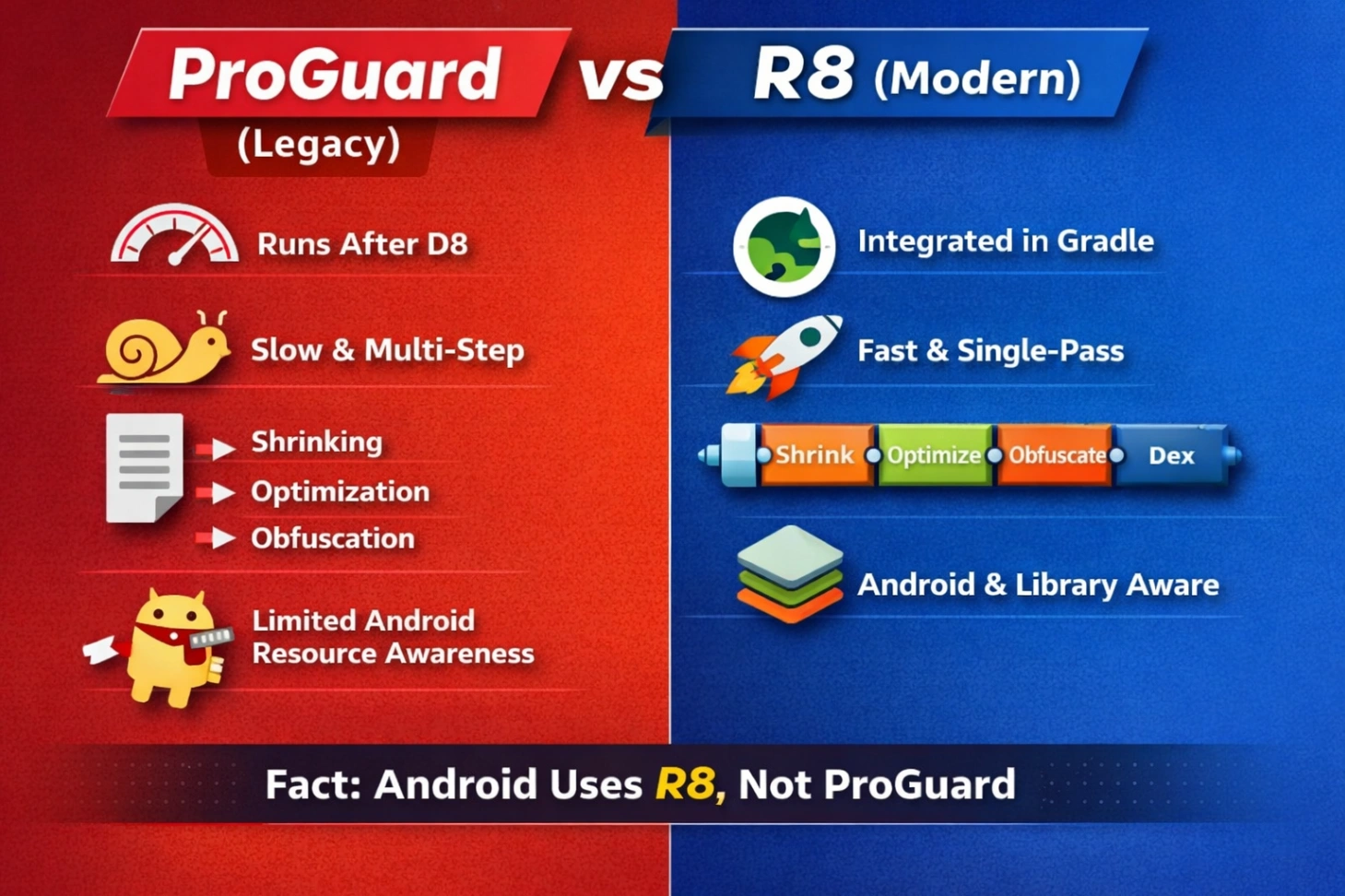
ProGuard vs R8 (Practical Context)
ProGuard (Legacy)
JVM bytecode post-processing tool
Ran after D8
Separate shrinking, optimization, and obfuscation steps
Slower and less Android-aware
R8 (Modern Default)
R8 replaces ProGuard and D8 together.
buildTypes {
release {
minifyEnabled true
shrinkResources true
}
}
Even though you write ProGuard rules, Android actually executes R8 internally.
R8 performs, in a single pipeline:
Code shrinking
Optimization
Obfuscation
Dexing
Faster, safer, and Android-optimized.
What Exactly Does R8 Do?
1. Code Shrinking
R8 removes unused code completely.
fun unusedFunction() {
println("Never called")
}
If unused, this function does not exist in the release build.
Benefits:
Smaller APK
Fewer methods
Reduced attack surface
2. Obfuscation
R8 renames classes, methods, and variables.
Before:
class PaymentManager {
fun processPayment(amount: Int) { }
}
After:
class a {
void a(int b) { }
}
Protects:
Business logic readability
App architecture clarity
Does NOT protect:
Network traffic
Runtime behavior
Secrets in memory
3. Optimization (Why Release Crashes Happen)
R8 aggressively optimizes bytecode.
if (BuildConfig.DEBUG) {
logDebug()
}
In release builds, this branch is removed entirely.
R8 also performs method inlining:
fun add(a: Int, b: Int) = a + b
Inlining improves performance but breaks reflection-based access if rules are missing.
4. Resource Shrinking
<string name="unused_text">Hello</string>
If unused, this resource is removed only when minifyEnabled = true.
Why Apps Work in Debug but Crash in Release
Debug builds:
No shrinking
No obfuscation
No optimization
Release builds:
Code removal
Renaming
Reflection blindness
So when someone says:
“Works on my machine”
It usually means:
“Works without R8.”
Reflection: R8’s Blind Spot
R8 works at compile time.
Reflection happens at runtime.
Class.forName("com.example.User")
R8 cannot detect this usage and may remove or rename the class.
This impacts:
Gson / Moshi
Retrofit
Room
Hilt
Serialization
What You MUST NOT Obfuscate
Data Models
data class User(
val name: String,
val age: Int
)
JSON:
{ "name": "Azeem", "age": 25 }
If fields are renamed to a and b, mapping fails silently.
Retrofit Interfaces
interface ApiService {
@GET("users")
suspend fun getUsers(): List<User>
}
Retrofit depends on:
Annotations
Method signatures
Reflection
Obfuscating these causes runtime crashes.
Room Entities
@Entity
data class UserEntity(
@PrimaryKey val id: Int,
val name: String
)
Room still relies on class structure and annotations.
Writing R8 Rules Like a Senior Engineer
Gson / Moshi
-keep class com.app.model.** { *; }
-keepattributes Signature
-keepattributes *Annotation*
Retrofit
-keep interface com.app.api.** { *; }
-keepclassmembers interface com.app.api.** { *; }
Room
-keep class androidx.room.** { *; }
-keep class * extends androidx.room.RoomDatabase
Why keepattributes matters:
Annotations are metadata, and R8 removes metadata aggressively unless preserved.
Mapping.txt (Production Lifeline)
Obfuscated crash:
at a.a(Unknown Source)
With mapping.txt, Crashlytics converts it back to:
LoginViewModel.validatePassword()
Without mapping files, production debugging becomes nearly impossible.
API Keys & Secrets (Hard Truth)
Bad practice:
const val API_KEY = "sk_test_123456"
Even if obfuscated, attackers can extract it at runtime.
Correct approach:
Server-generated tokens
Short-lived credentials
Backend validation
Certificate pinning
Never trust the client.
App Tampering & Repackaging
Attackers can:
Modify APK
Unlock premium features
Disable ads
Basic protection:
Signature validation
Play Integrity API
Server verification
These slow attackers, they do not stop them.
Performance Impact
With R8 enabled:
Smaller DEX files
Faster class loading
Improved cold start
Example:
APK size: 11.4 MB → 6.3 MB
Startup: noticeably faster
R8 is not a security feature.
It is a risk-reduction and performance optimization tool.
Real Android security comes from:
Server authority
Minimal client trust
Obfuscation plus validation
Continuous testing of release builds
If you only test debug builds, you are testing the wrong app.
Want to Crack Android Interviews. Join our WhatsApp group for more updates
Comments (0)
No comments yet. Be the first to share your thoughts!
Leave a Comment
Get the latest updates
Join our newsletter and never miss an article.